In my article about BLOOM I described a game that draws and sounds itself: every picture and every sound comes from the game state. This is the tool I used to make that happen, and you can open it in a browser and try it yourself.
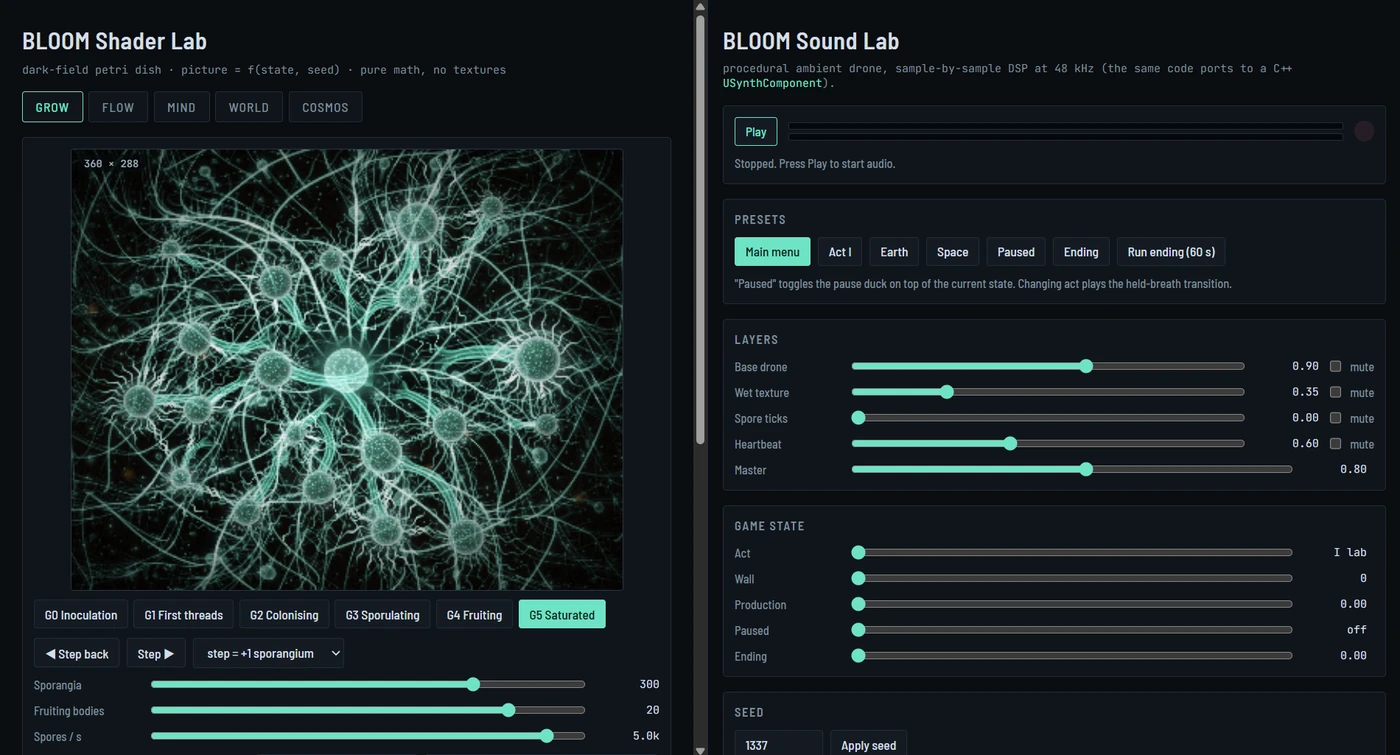
What's on the page
The page has two halves. On the left is the Shader Lab, with all five of the game's "walls." On the right is the Sound Lab, the game's ambience. On a narrow screen the halves stack one above the other. Neither half needs anything from the server: no textures and no sound files. Everything you see and hear is computed live in your browser.
The two halves are deliberately independent. Switching walls on the left doesn't change the sound on the right. Each half has its own controls, so you can listen to the sound of Act I while you look at a galaxy.
The Shader Lab: five walls, six stages each
Across the top are the five walls: Grow, Flow, Mind, World and Cosmos. Below them is the live window, at 360 × 288, the same resolution the game renders at on phones and on the Switch.
Each wall has six stages, which are presets for the game state, shown as buttons under the window. Grow runs from Inoculation through First threads, Colonising, Sporulating and Fruiting to Saturated. Flow runs from Dormant to Overloaded, Mind from a Lone node to a Quantum shimmer, World from a Clean planet to Fully veined. Cosmos runs from One seed to The last stand.
Between the stages you can move in small steps. Step ▶ and ◀ Step back change the state by the amount picked in the list next to them, for example one more sporangium, and the picture follows.
Below that are sliders for the game state itself, the same numbers the simulation produces: sporangia, fruiting bodies, spores per second, glucose income, signalling level, the pressure index, hyphal nodes, rhizomorphs, how full the processing cycles are, quantum hyphae, the percentage of the planet digested, the percentage of stars colonised, and Rogue Strains. Move any of them and you're changing the game's state directly, and the picture has nothing else to draw from.
There's also a seed, plus a button that picks a random one. The seed sets where the nodes sit, how the roots fork and which way the veins run. Different seeds give different organisms built from the same state. The same seed gives exactly the same picture every time.
Two cards are worth a look:
- State → parameters (CPU reference) shows what the CPU computes from the state and hands to the shader. This is the boundary I wrote about in the main article: the CPU decides and the GPU draws.
- Budget · Switch is the floor lists the limits each wall has to respect for the port to ES 3.1: constant loop bounds, uniform block sizes (Mind's block is 960 vec4s, Flow's is 880, both under 16 KB), and a redraw rate capped at 20 Hz. It also shows frame timing from your browser. The timing is only a relative number, but the static lines are the real contract.
Traces of history
Two small things on this page show how the look evolved.
The first is the style switch: B · Organic (noise fields) and A · Geometric (v0). The geometric version is the first one, lines and circles computed from distances. The organic one, built from noise fields, replaced it. I kept both side by side, because the comparison shows better than any description what changed.
The second is the aspect ratio list. Next to the current 5:4 · 360 × 288 there are 2:1 · 512 × 256 (old phone plan) and 4:3 · 384 × 288 (old Switch plan). For a while the window had different proportions on different devices. In the end I settled on one size for everything, and the old options stayed in the lab as a record of how I got there.
The Sound Lab: the game's ambience in your browser
Press Play. Browsers only allow sound after a click, so the lab waits for you. The status line then shows what's running, for example Playing (worklet, 48000 Hz, seed 1337), and the level meter starts to move.
The presets correspond to moments in the game: Main menu, Act I, Earth, Space, Paused and Ending. Run ending (60 s) plays the full sixty-second ending. Two behaviours are worth noticing. "Paused" lays the pause duck over the current sound, and changing the act plays the held breath: the sound dips, holds for a second, then swells back.
Under Layers you can mix the layers yourself: the base drone, the wet texture, the spore ticks, the heartbeat and the master level. Under Game state you set the inputs the game would send: act, wall, production, pause and ending. Turn production up and the spore ticks speed up, so you can hear the economy.
Here the seed works just like it does on the left. The rule the lab prints is simple: same seed + params + frame count = same samples. Same seed, same settings and same frame count give the same audio, sample for sample.
Why there's a lab at all
The lab wasn't made for show. I needed it while I was working. Shaders are hard to tune inside a running game, and you have to play for an hour to reach a late Cosmos stage. In the lab every state is two clicks away.
More importantly, the lab is the source of truth. The shader code lives in its GLSL blocks, and the rest of the pipeline reads from them. A script converts those blocks to HLSL for Unreal, other tools pull the network layouts from them, and the game's output is compared against what the lab renders. When I want to change a look, I change it here, and the game follows. The sound works the same way: the DSP block in the Sound Lab is what gets ported to the C++ synth, and an offline renderer checks it against stored reference renders.
The working version has more tools than the public one. It has an exact rewind test, which takes twelve random steps forward, walks back through the undo stack and compares every pixel. It has reference images, so I can compare by eye with the concept art. There's a freeze-time switch, and a monitor pass you can turn off. The public version hides all of that. The shaders, the state and the render loop are exactly the same in both; only the controls differ.
From a working tool to a public page
Turning my own tool into a page I could show strangers took more care than I expected.
The first version was a simple wrapper: two frames loading the two lab files. It worked, but when I opened DevTools I could see the full path to the file on my disk next to each frame. That's not something to publish.
So the page is now generated. A script takes both labs and embeds them in a single, self-contained HTML file (about 210 KB). Each half sits in its own frame as srcdoc, so the browser shows about:srcdoc in place of a file path. The page loads nothing apart from itself and the fonts. The script only edits the embedded copies, never the source labs, and it checks that the sound lab's DSP block stays byte-identical to the original.
It also has a privacy guard. Before writing the page, the script looks for anything that points at my machine: drive letters, file://, user folders, project paths, the names of internal tools. If it finds any of them, it refuses to write the file. My name is allowed in exactly one place, the copyright line.
One technical detail I learned along the way: audio needs a secure page. AudioWorklet, the modern way to run your own DSP in the browser, only works over https. On a plain http page the lab falls back to the older ScriptProcessor path. And inside a srcdoc frame opened from disk, the usual blob: URLs for the worklet code are blocked, so the code is loaded from a data: URL instead.
Before publishing I checked the page in headless Chrome. Both frames come up as about:srcdoc, the only requests are the page itself and the fonts, there are no console errors, and Play starts the worklet at 48 kHz. I took screenshots at desktop width and in a phone emulation at 390 × 844, with no horizontal scrolling.
Readable on purpose
You can read the whole source with View Source, and that's intentional. The page is for anyone who wants to see how I approach rendering, and code you can read says more than any description. What isn't here is the game: the C++, the HLSL port and the Unreal side stay private.
Pick a wall, step through its stages, change the seed and move the sliders. Then press Play on the right and give it a minute. Everything you see and hear comes from those few numbers.